Rocket League 2D Controls and Rules: A Match from Kick-off to Final Whistle
Published · 3 min read
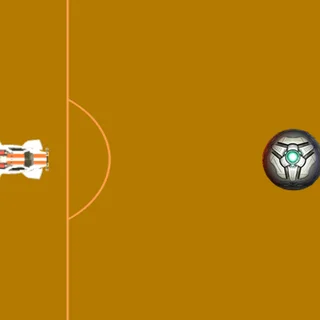
Rocket League 2D is a small game, and that is its charm: a flat pitch, two cars and a ball, with a two-minute clock. It is a fan remake by Stephen Kempisty, not the Psyonix game, and it plays differently from what you might expect. This guide covers the controls, the rules the game actually uses, and what happens from kick-off to the final whistle.
Starting a match
The game opens on a controls panel over the pitch. Two buttons sit at the bottom: 1 Player vs CPU and 2 Players. The first gives the blue car to the computer; the second is the original mode, where two people share one keyboard. Click one and the logo above the pitch turns into the match clock, starting at 2:00. There is no countdown — the cars can move at once.
The controls
- Orange: W accelerates, S brakes and then reverses, A and D turn left and right.
- Blue (2 Players): the arrow keys, in the same layout.
- vs CPU: both WASD and the arrows drive orange, so use whichever hand feels better.
Each press of a turn key turns the car ten degrees, and holding it keeps turning quickly, so a tap is a small correction and a hold is a U-turn. Speed builds in steps while W is held. Reverse tops out at a bit more than half the forward speed. If you let go of everything, the car slows down by itself: every half-second it loses a tenth of its speed.
Which goal is yours
The pitch is coloured by team: the left half orange, the right half blue. Orange starts on the left and attacks the goal on the right; blue starts on the right and attacks the left. The goals are not drawn as nets. Each goal mouth is the middle third of the end line, lined up with the penalty box markings. The whole ball has to be past the line between those points, so a ball that clips the end line near a corner just bounces back.
How the ball behaves
The ball reacts to which part of the car touches it. A hit with the front sends it forward, at least a bit faster than the car was moving. A hit with a side or the back pushes it away from that face. A corner touch deflects it at an angle, which is how most accidental own goals happen. Off the side walls the ball bounces back with a small extra push, and like the cars it slows down every half-second, losing a fifth of its speed each time.
One thing surprises everyone at first: the cars do not collide with each other. They drive straight through one another. Defending means getting between the ball and your goal, not bumping the other car.
Goals, the clock and the result
When the ball goes in, the goal horn sounds, the scorer's box above the pitch goes up by one, and both cars and the ball return to kick-off. With 30 seconds left a voice call plays, and each of the last ten seconds beeps. At 0:00 a panel announces WINNER! ORANGE, WINNER! BLUE or TIE GAME! and the pitch freezes. Click Play Again? for a fresh two minutes with the score back at 0–0.
What it is not
It is worth being clear about what is missing compared with the real Rocket League: there is no boost, no jumping, no aerials, no online play and no touch controls. It is a keyboard game for one or two people. Within those limits it is a quick, fair little match — and on the same keyboard it can get loud.
Ready? Play Rocket League 2D, then read how to beat the CPU.
More from the blog
- How to Beat the CPU in Rocket League 2D
What the computer-driven blue car does, how to win the ball when it circles, and where to shoot and defend.